
6 underrated Proxmox tools that make managing your home lab so much easier
Proxmox may be well known for its top-tier virtualization performance, FOSS nature, and native support for LXCs, but it has a ton of other features that make it stand out from the rest of the server platforms. Take its compatibility with first- and third-party tools, for example. Thanks to the talented minds at Proxmox and a supportive community of tinkerers, the PVE ecosystem is laden with handy services you can integrate with your home lab.
But with a staggering number of Proxmox-centric projects on GitHub, many utilities tend to stay out of the spotlight and don’t get the recognition they deserve. That’s a shame, because some of these tools are a godsend for managing, troubleshooting, and monitoring your Proxmox home lab.

Although Proxmox’s web interface isn’t what I’d call complex, it still requires you to navigate through waves of options for even the most basic tasks. The VM creation wizard, for example, can get rather annoying when you need to deploy dozens of virtual machines for a DevOps project. Using CLI commands is a worthwhile option, though it’s pretty difficult to remember the jargon for every single management setting.
ProxMenux offers a solid compromise between the ease of a web UI and the quick pace of terminal commands. Featuring a menu-based terminal UI, ProxMenux lets you control your PVE instance directly from the Shell tab. This includes everything from creating virtual guests and defining storage pools to configuring network settings, installing packages, and other management tasks. It even integrates with the ultra-useful Proxmox VE Helper-Scripts repo and lets you configure hardware acceleration for LXCs. But since it can’t pass PCI devices to VMs, you’ll want to look into PECU as well…
Proxmox Enhanced Configuration Utility
The easiest way to pass GPUs to VMs
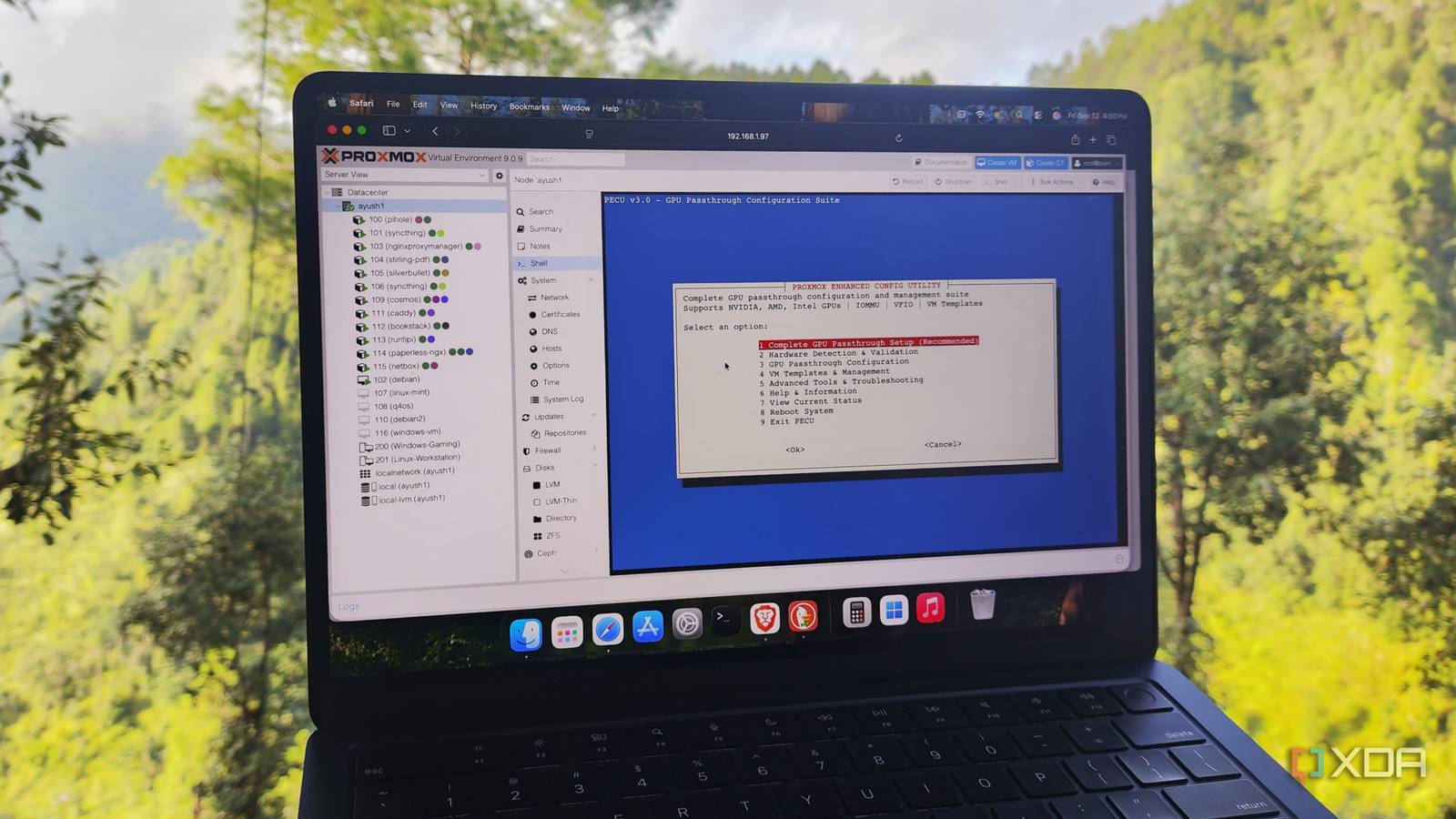
PCI passthrough may be a game-changer for advanced server projects, but it’s a pain to implement for virtual machines. You’ll have to enable interrupt mapping, modify the bootloader to enable IOMMU mapping, and add extra VFIO variables to your modules file. Then there’s GPU passthrough, which requires even more tweaks – including blacklisting drivers for the host, tweaking config files, and making changes to the initramfs file system.
Manually performing these tasks can get tedious, and it’s easy to fumble certain configuration file edits. PECU includes a variety of tools, but its ability to enable GPU passthrough without forcing you to modify numerous config documents alone makes it worth using. It’s compatible with GPUs from the three big players, and even works with iGPUs. Throw in some built-in VM templates and a handful of troubleshooting commands, and PECU becomes a solid addition to any PVE enthusiast’s workstation.
PVE-mods
Specifically, the Node sensor readings view package

Proxmox 9 may have upped the number of resource utilization graphs, but it’s still missing one critical feature: the ability to monitor the temperature of the underlying components. After all, even home servers can get hot during extended workloads, making real-time temperature monitoring quite necessary.
A few weeks ago, I used a variety of methods to grab temperature metrics of my PVE nodes before eventually honing in on the Node sensor readings view package within the PVE-mods repository. Unlike all the makeshift solutions that display the metrics inside the terminal or an external web UI, this handy package adds real-time temperature statistics for the CPU core, storage drive, RAM modules, and case fans on the Summary page of your Proxmox node.
Authentik
An SSO server for your PVE hosts and virtual guests
Creating complex passwords is essential if you want to increase the security of your home lab. But on a convenience front, logging in with long user credentials on each container and virtual machine can get rather annoying, especially when your server runs dozens of services like mine. A Single Sign-On server provides the best of both worlds, as it provides secure logins for your self-hosted apps without forcing you to enter hard-to-remember passwords.
Authentik is easily my top recommendation for a private SSO server. For one, Authentik combines exceedingly well with Proxmox – and I mean both the PVE web UI and your self-hosted app stack. It’s also compatible with the essential authentication and authorization protocols out there, and lets you monitor the login attempts from its intuitive web UI. However, I recommend configuring Authentik on a different node, preferably one where you don’t perform server experiments. That way, your Authentik instance will remain active even if a failed project brings your PVE workstation down.
Log2Ram
To slow down SSD wear
Although it’s a good idea to use enterprise-grade storage drives for Proxmox, they can be rather expensive for casual users. In fact, I tend to use consumer-grade SSDs on my secondary PVE node and clusters simply because I don’t want to drop extra money on old laptops and cheap mini-PCs. Unfortunately, SSDs have limited write cycles, and Proxmox’s frequent logging operations can introduce some extra wear, which can stack up over a long period of time.
As such, installing Log2Ram is a good idea if you value the longevity of your SSD-based Proxmox storage pools. What it does is write the logs onto the RAM, before transferring them en-masse to your SSD. Sure, it’s not going to get rid of the SSD wear problem entirely, but it’s still a decent way to lower the excessive write operations on your storage drive.
Proxmox VE Custom Integration for Home Assistant
A powerful HACS integration for smart home and server lovers

Even without any add-ons, Home Assistant is easily the most powerful smart home management platform out there. But its utility jumps to the next level once you throw in the insane number of integrations on the Home Assistant Community Store. Hidden among thousands of cool HACS integrations is one geared specifically for Proxmox.
To be more specific, the Proxmox VE Custom Integration for Home Assistant lets you combine your Proxmox machine with HASS – and not just the host system, either. This handy integration lets you add your virtual guests and storage drives to Home Assistant as though they were typical smart devices. As such, you can not only add them to custom HASS dashboards and monitor their resources, but also create powerful automations to control their operations.
Which tools do you consider essential for your Proxmox machine?
After experimenting with Proxmox for ages, I’ve encountered dozens of useful tools for this powerful virtualization platform. Pulse handles my PVE monitoring needs and sends alerts to Gotify as soon as something goes wrong in my home lab. I’ve also got two Proxmox Backup Server instances – one in my home lab and another in my family’s home – which receive snapshots from my Proxmox host. Speaking of first-party tools, Proxmox Datacenter Manager is a godsend when I need to quickly migrate VMs and LXCs between my standalone and cluster PVE nodes.

I clustered budget-friendly devices into a Proxmox HA lab, and it’s more useful than I thought
Clusters may not be for everyone, but they work really when you need high-availability support for your Proxmox nodes
link